
Your medications and health records, on your device.
Reminders, refills, conditions, doctors and clinics — one private place for your health. No account, no ads, and reminders that fire with or without a connection.
More than reminders — your complete health record
Upkit is a digital health app, not just a reminder. Medications, conditions, doctors and clinics in one place, linked together, on your device.
-
Medications
Doses, schedules, stock levels and refill dates for every medication you take.
-
Health conditions
Record the conditions you manage and link them to the medications prescribed for them.
-
Doctors and providers
Keep the details of every clinician involved in your care, linked to the conditions they treat.
-
Clinics and facilities
Save the pharmacies, clinics and hospitals you visit, with locations when you need them.
Built for complex medication schedules
Multi-stage prescriptions, as-needed doses and irregular intervals — handled properly, not forced into a daily alarm.
-
Flexible schedules
Daily, weekly or monthly patterns, hourly intervals, take-and-break cycles, as-needed (PRN) doses and custom dates.
-
Actionable reminders
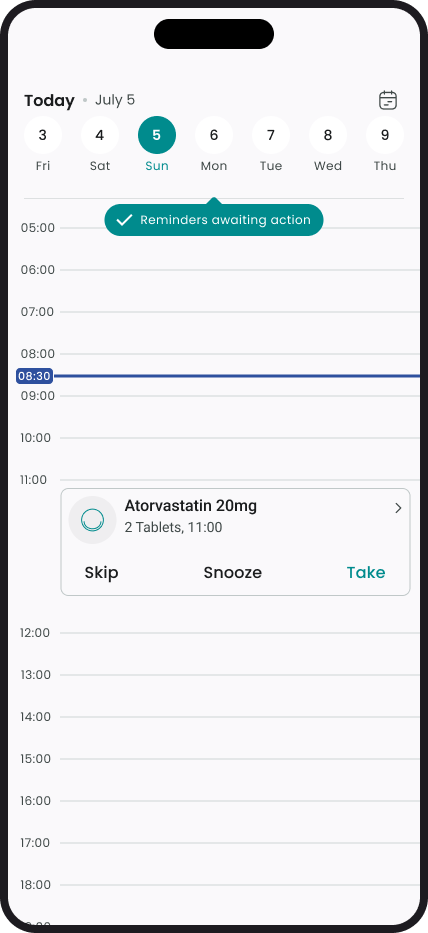
Mark a dose taken, skip it with a reason, or snooze — straight from the notification.
-
Refill and stock tracking
Count what you have once. Upkit estimates what's left as doses are taken and reminds you before you run out.
-
Multiple schedules
Add more than one timing rule to a single medication, for prescriptions that change partway through.
-
Pause and archive
Pause a course or archive a finished one without losing its history.
-
App lock
Lock Upkit with a PIN, or with biometrics where your device supports it.
Your records stay on your phone. When someone needs to see them, you decide.
Every dose taken, skipped or missed, every stock change, every note — kept as one history on your device. When a clinician needs it, export a copy and hand it over yourself. Or export a Medication Report — one PDF of the medications you choose, with their schedules, notes and photos.
-
Filter to what matters
Narrow your history by date range and dose status, and choose whether to include stock and general logs. The count updates as you choose.
-
Export as PDF or CSV
Download any medication's history as a PDF to read, or a CSV that opens in Excel or Google Sheets.
-
Medication Report
One PDF of the medications you choose, from the Medications list — with each one's schedule, instruction notes and photo.
-
Reports that show their work
Every export states what it covers — a History Report its date range and which records were included and left out, a Medication Report which medications you chose out of all you have recorded — so a partial record is never mistaken for a complete one.
Exports are created on your device, only when you ask for them, and cleaned up automatically afterwards. Upkit never sends them anywhere — where the file goes next is your call. Every report also links to what an Upkit report is and isn't — a plain-language page for whoever receives it, explaining that it's a self-recorded log, how your filters or your selection change what's shown, and what each label does and doesn't mean.
Privacy-first: your health records stay on your device
There is no account to create and nothing to sign up for. Your medications, conditions and history are stored encrypted on your phone, and your reminders don't need a connection to work.
-
No account needed
Download and start. No sign-up, no email, no password.
-
Stored on your device
Your medications, conditions and history are encrypted and kept on your phone.
-
No ads, no data selling
No advertising, and we never sell your data or share your health records with insurers, advertisers or data brokers.
Some things do leave your phone, and we'd rather list them than round down. Always: crash reports, performance measurements, app configuration, a check on whether you've supported Upkit, and — when you install the app — a check with your app store on whether an advert brought you here. When you search for a clinic's address, that search does too. Anonymous usage statistics are off unless you turn them on, though a few technical start-up events are recorded before your choice is applied each launch. Your medications, conditions and history are not among any of it.
Set up in under two minutes
Three steps from download to your first reminder.
-
STEP 01
Download the app
Available on iOS and Android.
-
STEP 02
Add your medications
Enter your prescriptions, dosages, and preferred reminder times.
-
STEP 03
Get notified
Receive reminders on time, and keep a history you can hand to your doctor.
Frequently asked questions
What is Upkit?
Upkit is a privacy-first digital health app. Track your medications, conditions, doctors and clinics in one place, with reminders and refill alerts — no account needed, and your records stay on your device.
Do I need to create an account?
No. There is no sign-up, no email address and no password. Download Upkit and start using it straight away.
Where is my health data stored?
On your device, encrypted. Your medications, conditions, providers and history are not uploaded to Upkit.
Can I give my medication history to my doctor?
Yes, in two ways. A History Report: filter one medication's history by date range and dose status, then export it as a PDF or CSV. A Medication Report: from the Medications list, pick the medications to include and export one PDF with each one's schedule, instruction notes and photo. Every report states what it covers — the period and records for a History Report, the medications you chose for a Medication Report — and you hand the file over yourself.
Do reminders work without an internet connection?
Yes. Reminders are scheduled on your device and fire whether or not you have a connection.
Is Upkit free?
Upkit is free to download, and everything described on this page is included at no cost.
Ready to take control of your health?
Free to download. No account needed. Reminders work offline.